Friday, October 18, 2013

Leaps and Bounds

With each passing day, the game becomes more of a reality.  Whether I spend a day knocking out a single complex system or find time to hammer out five or six different things, it all leads to one thing...progress.  I find that as long as I continually move forward on a project, I eventually get to the end.  It's the best advice I can give to someone who is working on anything.  Just keep working and you'll get to where you're going eventually.

As for this game, there are a lot of new things, but not all of them are things that allow me to show screenshots.  Still, there are a few things to show off since last time.

Even though I couldn't salvage the other version of the game due to some strange errors (and I never did figure that mess out), I was able to pull some of my work from that version.  That means that this version now has all 12 classes, skills, perks...etc.

Since I've already shown off the screens where you pick your skills and perks and I don't want to repeat myself, here's a screenshot that highlights what you would see if you examined a character's skills and perks during gameplay:


The "Back" and "Next" buttons allow you to look through the skills and perks of each character in your party with ease.

Of course, starting characters wouldn't normally have six different perks.  1st level characters only get three, but I threw a couple of extra ones onto my test characters just so I could see how they would display.   During the course of the game, a character can accumulate up to eight perks in total.

In addition to the skills and perks, a lot of work has been done with the inventory system.  I've shown the inventory screen previously, so I won't bore you with another shot of that.  Instead, we'll talk about the different things you can do with the inventory.

There are items that you can equip (like armor, swords, shields, boots, helmets, etc), and that functionality is fully in place.  Sometimes, you want to drop something, and you can accomplish that easily enough.  Or, trade it to someone else in the party...and even that can be done without issue.

The hard part was coding the things that can be used.  Things like bandages, which can be used to heal your party.  Or mana crystals, which can be used to recharge the mana of your spellcasters when they can't rest in a hostile environment.


Selecting a character to heal.

In order to assist the player, I have added pop-up windows.  These windows provide feedback or allow the player to make choices.  In the picture above, for example, the player can select which character should be healed with a bandage.

Of course, one thing I always disliked about old-school CRPGs is when you do something that you didn't need to do without realizing it.  For example, drinking a healing potion when you were already healed...or clicking on a character that was already healed and hitting them with a heal spell that they didn't need.

So, I have created safeguards.  If a character is already fully healed (or has full mana, or whatever), the game will actually let you know that you don't need to do that and won't expend whatever item you were trying to use.

This character tried to use a bandage on himself when he wasn't hurt.  What a doofus.

I wish all CRPGs did this, but they don't.  So, that's just the way it goes.  But, with this game I want to be sure that player's don't waste resources on accident.  It happens.  And it sucks when it does.  Hopefully, this will make it suck less.

Finally, after several different revisions, I have come up with a design that I like for the main screen.  Some people won't like it.  They have told me that games shouldn't have character GUIs and that they get in the way...but I think this is only a modern way of thinking.  Old-school CRPGs had character GUIs, so this game will have one as well.

Yes, I created a version at one point where the characters weren't seen and would show up when you pressed the "ESC" key...but if I wanted to build a modern style game, then I would build one.  That's not the kind of game I'm building...so people who don't like it can do something else.  There are plenty of games for them to play.

The text box is not always visible.  It does go away when there isn't text to be displayed.
This is the state of the game currently.  It's coming along well.  I haven't had a lot of time to post here recently.  But, that's probably because I'm spending my time programming instead.

Looking forward to your feedback...

Wednesday, September 11, 2013

Round and Round We Go

Anyone who reads this blog regularly is probably going to start thinking I've lost my mind, but I have taken a step back again.  This time, I didn't start all over, but I did go back to the version I had been working on previously (the version with 12 classes and perks and skills).  There were a lot of things that prompted this, and I won't explain them all, but the main one was this:

* The new version wasn't working out the way that I wanted it to work out.

It was very restricting.  It took me two months, but I finally remembered why working on the first version in Unity was liberating:  Because I wasn't bound into the same box I had been stuck in back when I created the first version in Visual Studio.  So, going back and trying to get Unity to conform to that box turned out to be a terrible mistake.

I lost two months of time, but I learned some really important lessons.  A lot of them actually.  And, I think going forward, we'll see a lot more interesting things start to happen.  This experience has freed me and cut me loose from the box that I couldn't see around. 

So, I'm taking a step back again...but it really feels like a step forward.  Some of the best lessons are the hardest to learn.

Tuesday, August 27, 2013

Updated Character Screens

Even though the updates to this blog have become less frequent doesn't mean that progress on the game has stopped.  In fact, I've been working pretty hard.  The problem is that there is very little that can be shown.  Working with code and rebuilding systems from the original version of the game is an essential step...but leads to some very boring blog reading.  I'm sure you don't much care to hear how I revamped the item class objects or worked out the steps to make text print just the way that I want on the screen.  It's interesting to me, certainly, but I'm likely the only one who would find it so.

Still, some progress has been made.  I like to show off the progress to keep those who are interested up to date with how things are coming along.  This time around, I don't have a lot of visuals to show off, but at least I have something to prove that I haven't been sitting on my hands the last month and a half.

This time around, we'll look at the new version of the character screen.  But, before we do that, let's remind ourselves what the old version looked like:

The original character screen in all its glory.

The updated version includes all the same information, laid out in much the same way.  But, it looks a lot nicer.  A whole lot nicer.  Let's take a look:

Updated version.

There's still some work to be done.  The "Continue" button at the bottom shouldn't be showing.  When the character panel loads, it should be turned off.  It's not a broken function or anything, I just haven't coded it yet.  Some of the numbers need to be aligned correctly as well.  They look sort of crooked to me.

I'd like to think that the new, more colorful version of the character screen shows that the game is keeping its roots while updating it's look. 

But, there are many things that can't be seen from just this one screenshot.  Since the last posting, I have updated the number of classes available in the game.  We have gone from four to seven (Warrior, Knight, Scout, Ranger, Priest, Sorcerer, Battlemage). 

Decisions are being made about how to handle the combat in this game as well.  I want to increase the tactical options, but still keep it simple enough that anyone who has played games of this nature will be able to pick it up without a manual or a tutorial.  It's not easy, but ideas are starting to form about how it will all flesh out.

So, if you're following the development of the game, stay tuned.  There will be some exciting stuff coming.


Tuesday, July 16, 2013

Going Back to Square One

I spoke in another post about scope creep.  In the last few months, this project has started to succumb to that very issue.  The more new things I wanted to add to the game, the more overwhelming the project became.  While everything was looking great, in reality it was becoming a mess and I started to realize that I had gone far, far away from what I had originally intended for this game.

So, I have gone back to square one.  The beginning.  I have started over.  Using the Unity engine, I am going to rebuild the game in the same style as before.  I will save all the stuff I want to add like additional classes, skills and perks and other things for a sequel or an updated version.  Rather than make the game a complicated mess that might not get finished, I would rather build it the way that I want and see it completed.

And, you know what?  I'm fine with that.  I think the game will still be good and will showcase what I can do.  Everything else can come later when I have more help or funding or whatever.

There will still be some updates, though.  I'll be using the 3D engine in Unity to render dungeons and locations versus the hand-drawn style I used in Visual Studio.  And I am still considering trying to make the combat engine work more like a Gold-Box game (like "Pool of Radiance") versus something like Phantasie.

Anyway, here are some comparison screenshots of the way that the game looked originally and how it is shaping up in Unity (which is also allowing me to create the game so that it can be played in full screen versus a little window).  Let's start with the Title Screen:

The original title screen.
The new title screen.  Look familiar?

Here are the main menus:

The original Main Menu screen.

The Unity version of the Main Menu screen.


When generating a character, these are what the attribute screens look like:

The original screen used to generate attributes.

The Unity version of the screen used to generate attributes.

Obviously, the screens are all similar.  This was done purposely.  And it may not be obvious here, but the screens in Unity look nicer.  Not only are the graphics and fonts better, but it's also in widescreen format, giving more space to lay things out on the screen.  Clicking on the pictures might make it more clear.

The original game ran in a window that was 1000 x 700.  The Unity version runs full screen at 1280 x 720, giving far more real estate for items on the screen.  This is all a good thing and I can't see myself going back to doing things the hard way.

So, these last few months have been a learning experience about what I wanted to do with this game.  In the end, I still have a lot of things I'd like to do, but they really need to go on the back burner for the moment.  Let me get the new version of the game caught up to the old version first.  Then, I can enhance it a lot.  It's what I should have done from the beginning.

As always, I'll be glad to hear any feedback you want to offer.


Friday, June 14, 2013

Combat Screens

I've been thinking a lot about how I want to approach combat in this game.  There are a couple of different options.  The one I wanted to pursue was to do the combat in a manner similar to the old Gold-Box style games (Pool of Radiance, Curse of the Azure Bonds, etc).  But, the amount of work involved might be more than I want to undertake at this point, since the project is already so large.

There's a term called "scope creep" that's appropriate here.  You start off with a project that is simple, but you continue to add new things to it and it gets larger and larger and takes longer to finish.  Eventually, you add so many new things that you just lose track of what you're doing and the whole thing sinks.

Let's take a look at the original way that combat was presented in the old version of the game:

Fairly simple

Some of the feedback I got was that this kind of combat wouldn't be as "tactical" as other combat options.  I took this to heart, but I'm starting to think that those people don't understand my vision for this game.  I wanted it to have combat similar to the SSI game "Phantasie," and that's exactly what I accomplished.

So, even though I haven't made up my mind 100% yet, I'm starting to work out how the same combat system would work in Unity.  So far, this is what I have come up with (this is a staged combat between a party of female adventurers and several goblins and giants in the forest):

Same simplicity

This is an early version screenshot that I created just for layout purposes.  It isn't a working system at this point (but that will come soon enough).

Perhaps, instead of trying to replicate what has already been done, I should just stick with the combat engine I already created and update it.  It's different from what you usually see in western style CRPGs.  And even though it is similar to combat systems you sometimes see in eastern JRPGs, it's not quite the same.

It's still a toss-up at this point.  I originally pursued the type of combat I did because it was better than the "text-only" style of combat that appeared in games like "The Bard's Tale," but still simple enough for someone to pick up pretty easily.  I think that combat like this can still be "tactical," even if you don't involve yourself in a lot of moving around.  You still have to know when to cast precious spells or hold on to them, when to heal members of your party, and which opponents to strike to do the most damage and bring them down before they can hurt you.

It's a tough call.


Saturday, June 1, 2013

Building Characters

It's been a while since I've had time to update the blog.  Since my last writing, I have started school again to pursue a bachelor's degree in Software Development.  So, I've been quite busy with school work and prepping for certifications.

However, work has not stopped on the game.  In fact, I have increased the number of options available for characters.  In the old version of the game, you got four randomly rolled stats (Strength, Intellect, Agility and Willpower) and you got to choose your from four different classes.  And that was it...you were stuck with those choices.

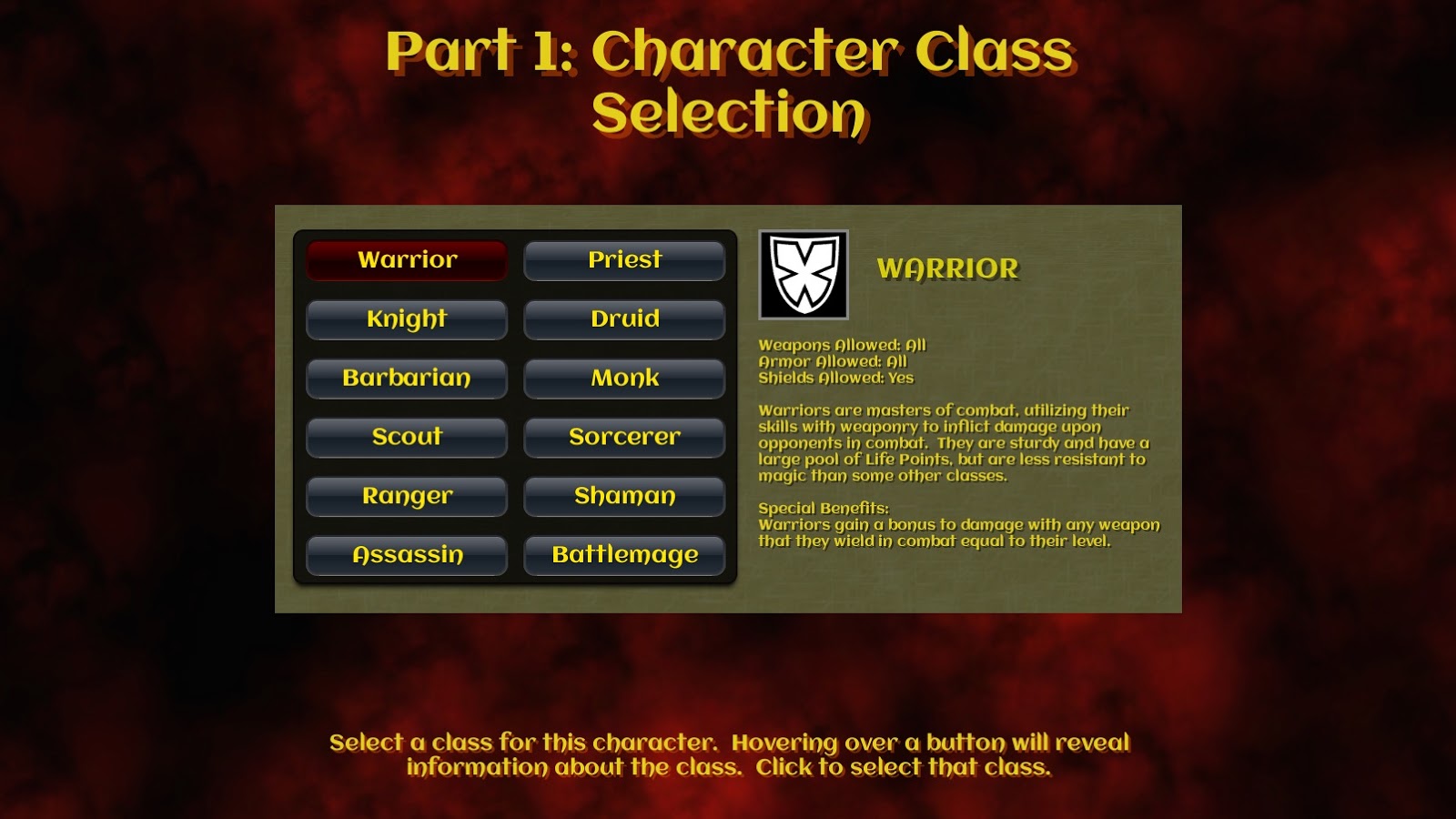
The new version of the game is a whole different kind of beast.  I've already mentioned that the number of classes has gone from four to twelve.

Part 1: Selecting your character's class

In addition to changing the number of classes you get, I have also removed the random elements from the attributes.  You are no longer stuck with fickle dice routines to figure out how strong or smart your characters are.  Now, instead, you can use a point-buy system to decide that for yourself.

The numbers are much lower now, but the outcome is the same.  Having a 5 or 6 is a really good score to start with, and there will be opportunities to increase them as the character goes up in level.

Part 2:  Figuring out your attributes (is it just me or does this screen need work?)

But, I really wanted to make the game do a whole lot more than represent classes and numbers for the characters.  I wanted to find ways for the player to tailor their characters to be individuals and to have whatever strengths that the player wanted to build towards.

So, I devised a working skill system:

Part 3: Buying skills using skill points


Skills increase a characters chance to do something.  Obviously, having a "One-Handed Sword" skill of 3 will make this character hit more frequently and perhaps for slightly more damage when using that type of weapon than someone who has a 0. 

There are even skills for dealing with things outside of combat, like diplomacy, research and bluff.  And yes, I do intend for them to be used within the game.  Nothing represented in the skills will be unused.

But, the good news is that none of the skills require you to have points in them.  A score of 0 just means you don't have any kind of bonus...so your chance is just less good than another character that might have spent points to build the same score up to 5.  All skills can be used "untrained."

Of course, I didn't stop with skills.  I went the distance:

Part 4:  Selecting Character Perks

Characters can also select from a group of perks to help enhance their characters further and really give them some interesting choices.  They will get a couple to start with and will have opportunities to pick up a few more as they progress in levels.

All in all, I think this will help bring the characters in the game to a whole new level versus the way that they were handled in the original version of the game.  I'm pretty excited about the direction it's headed.


Wednesday, April 24, 2013

Screen UI Update

Two posts in one day?  I must be on a roll.

This will be a quick one, though.  I recieved some feedback about the UI.  I'm told it was a bit ugly and that the font looked too modern.  So, I've changed both.  It now looks like this:

Thanks to my wife for suggesting this.  She doesn't even play games like this.

I think I like it better than the other version.  What do you think?